Logging
Proper logging is essential for debugging and monitoring your plugin's behavior. The Aloha SDK provides a logger instance through the plugin context.
Basic Usage
Getting the Logger
Access the logger through the plugin context:
typescript
import { Plugin } from 'aloha-sdk'
import type { Logger, PluginContext } from 'aloha-sdk'

export default class MyPlugin extends Plugin {
  private logger: Logger

  constructor(context: PluginContext) {
    super(context)
    this.logger = context.getLogger()
  }

  async toolCall(toolName: string, args: Record<string, any>): Promise<string> {
    // Logs "Tool called: getWeather { city: 'Los Angeles', type: 'wind-direction' }"
    this.logger.info('Tool called:', toolName, args);
    // Your implementation
    return 'result'
  }
}
Logs Location
By default, Aloha writes logs to the following locations:
- on Linux:
~/.config/aloha-desktop/logs/main.log - on macOS:
~/Library/Logs/aloha-desktop/main.log - on Windows:
%USERPROFILE%\AppData\Roaming\aloha-desktop\logs\main.log
Logging Errors
Aloha Desktop automatically logs errors thrown from the toolCall method. You don't need to manually log errors unless you want to include additional context.
Example
When your plugin throws an error, Aloha automatically formats and logs it with the function name and arguments:
typescript
import { Plugin } from 'aloha-sdk'
import type { PluginContext } from 'aloha-sdk'

export default class FileManagerPlugin extends Plugin {
  constructor(context: PluginContext) {
    super(context)
  }

  async toolCall(toolName: string, args: Record<string, any>): Promise<string> {
    if (toolName === 'listFiles') {
      if (!this.directoryExists(args.directory)) {
        // Just throw the error - Aloha will automatically log it
        throw new Error("Directory doesn't exist")
      }

      // Your implementation here
      return 'file list'
    }

    throw new Error('Unknown tool')
  }

  private directoryExists(path: string): boolean {
    // Your directory check logic
    return false
  }
}
This will be automatically logged as:
Plugin tool call error: listFiles { directory: '/downloads' } Directory doesn't existAloha Desktop will also show the error message in the conversation history:
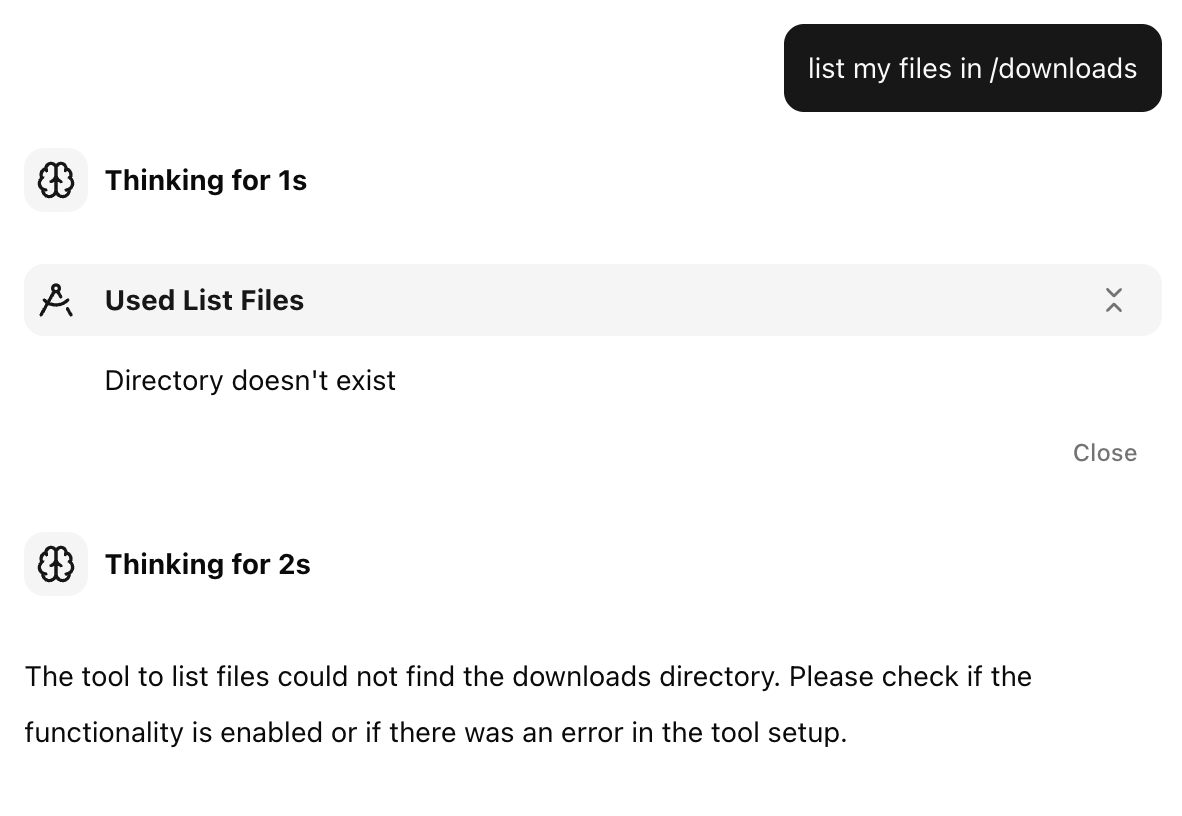
Logger API
ts
error(...params: any[]): void;
warn(...params: any[]): void;
info(...params: any[]): void;
verbose(...params: any[]): void;
debug(...params: any[]): void;
silly(...params: any[]): void;
log(...params: any[]): void;
Next Steps
- CLI - Learn about the SDK CLI tools
- Rendering Web Content - Fetch and render web pages
- Plugin Requirements - Review all requirements
- Examples - See logging in real plugins